















































































Tracking and summary of shipments for your orders
Quick Shipping Info is a Dolibarr module designed to give you full visibility of your shipments directly from the order page.
Track the status of your packages, anticipate logistical constraints, and simplify the management of your deliveries.
Summary of shipments and package tracking
Track the status of your packages, anticipate logistical constraints and simplify the management of your deliveries.
Quick Ship Info est né d’un constat simple mais quotidien : dans Dolibarr, accéder aux informations d’expédition d’une commande implique plusieurs clics, naviguer dans l’onglet Expédition, descendre jusqu’à la liste des envois et ouvrir chaque expédition pour accéder au suivi colis.
Pour les équipes logistiques et commerciales, ces actions répétitives deviennent chronophages, surtout lorsqu’on gère de nombreuses commandes chaque jour.
Nous avons donc créé Quick Ship Info pour simplifier ce processus et rendre l’accès aux informations essentielles immédiat, directement depuis la fiche commande.
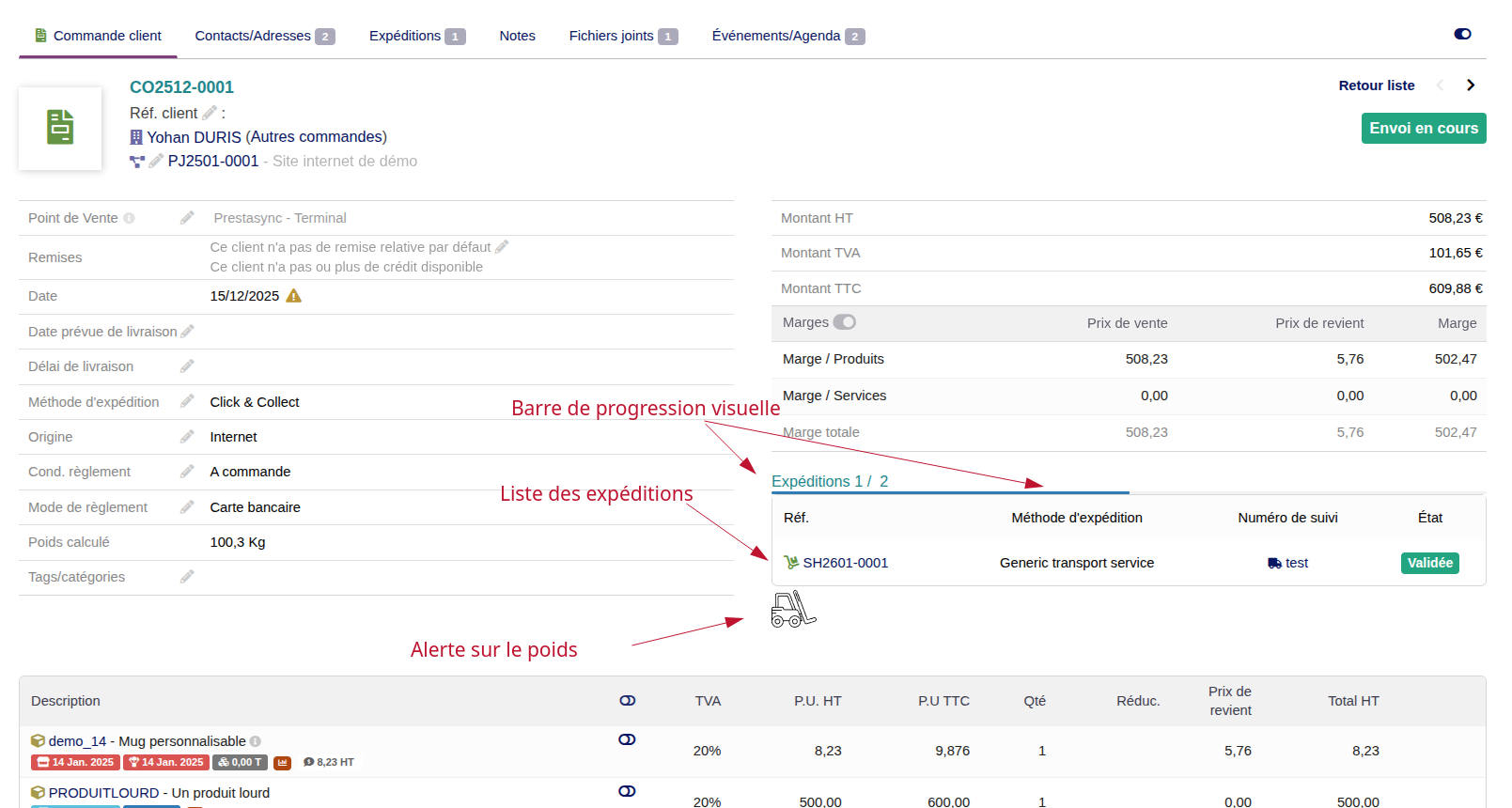
Shipment summary and package tracking
This summary view allows you to quickly know the status of deliveries and identify partial or pending orders.
- The complete list of shipments related to the order.
- The status of each shipment (being prepared, shipped, delivered, delayed, etc.).
- Clickable package tracking links, accessible directly from Dolibarr.
- A visual progress bar showing the number of products already shipped for the order.
Weight and dimension alerts
To simplify preparation and handling, Quick Ship Info analyzes the order’s products and automatically flags:
Weight alerts
Products whose individual weight exceeds a threshold, for example 30 kg, to warn of handling risks.
Size alerts
Products whose length exceeds a defined threshold, to prevent any transport or packaging issues.
These alerts are displayed as clear icons on the order page, allowing you to plan your shipments safely.
Why install Quick Shipping Info?
- Access shipping information immediately directly from the order page, without opening the Shipment tab.
- Full view of shipments and their status, without scrolling to the bottom of the page or clicking on each shipment.
- Instant package tracking: clickable tracking links directly from the order.
- Save time and streamline your workflows, especially if you manage many orders or partial shipments.
Download the module: Quick Ship Info
Module available on Dolistore, the official Dolibarr sales platform

Download module
The module is available on the product page of Dolistore
Try the module live!
Test the module in real conditions on our demo environment!
Stay informed of updates
Don’t miss any improvements or new features for your modules.
Subscribe to our newsletter and receive the latest news, update information, and tips to optimize your tools directly in your inbox.
Why is the module not sold directly on the THERSANE e-store?
At THERSANE, we have chosen to offer our modules through Dolistore to actively contribute to the Dolibarr project. Indeed, each sale made on Dolistore helps to fund a commission for the Dolibarr association. This contribution supports the development and maintenance of the software, thereby benefiting the entire community that relies on it.
By purchasing through Dolistore, not only do you receive a high-quality module, but you also support the open-source project that is the backbone of Dolibarr.
Thank you for your trust and commitment alongside THERSANE and the Dolibarr community!
Installation via ZIP file and graphical interface
- If the module is provided as a ZIP file ready for deployment (named module_xxx-version.zip, for example, when downloaded from a marketplace like Dolistore), follow these steps:
- Go to the menu Home > Configuration > Modules > Deploy an external module.
- Upload the ZIP file of the module from your computer.
- Important note: If an error message indicates that there is no "custom" directory, ensure that your Dolibarr installation is properly configured and that the directory is accessible.
- You should now see the module you just uploaded in the list. Click "Activate" to start using the module.
- If the module requires it, configure it and assign rights to your user groups and/or users.